
Disable banner ads from Skype for Windows

April 16, 2021
Technology
Disable banner ads and enjoy an ad-free browsing experience with our technique. Say goodbye to annoying banner ads on skype today!
Before the many updates to Skype post-Microsoft acquisition, simply disabling the promotions options in settings was enough to rid your conversations of unnecessary spam. However, a new banner ad has made its way to the conversation window. This ad wouldn’t be such a bother if it didn’t often cut into the video feed area when going full screen. There is a simple step to disable the ads.
Have A Project In Mind?
From Web Development To Shopify And AI Solutions, Let’s Discuss
How
We Can Help Your Business.
Consultation
Team
Solutions


Step 1:
Open Control Panel and double click on Internet Options icon. The following popup window will appear.
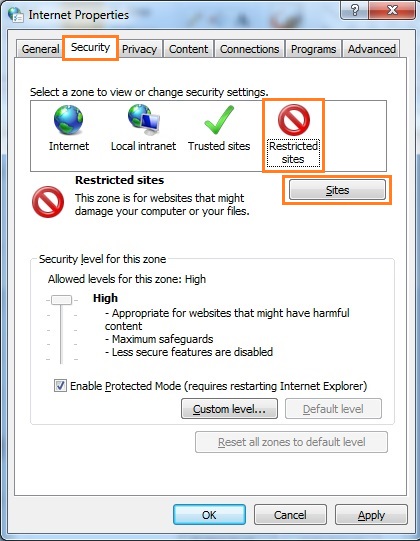
Under the Security tab click on Restricted sites and then Sites button.
Step 2:
Once clicked the Sites button you will see the following popup window.
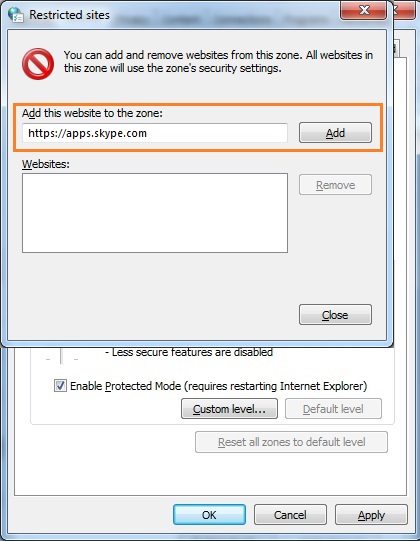
Add https://aaps.skype.com in the Add this website to the zone: text input and click Add button.
Restart your Skype.

Hurry! No more banner ads on Skype
Have A Project In Mind?
From Web Development To Shopify And AI Solutions, Let’s Discuss
How
We Can Help Your Business.
Consultation
Team
Solutions
Rate this article!
Let’s Build Something Great!
Submit your idea and get a free project roadmap from our experts
Join 1+ Subscribers
Get the weekly updates on the newest brand stories, business models and technology right in your inbox.